AI TOOL / #02353
K8Studio
A Kubernetes IDE that simplifies monitoring and management.
Introduction
Kubernetes IDE for simplified monitoring and management.
What is K8Studio?
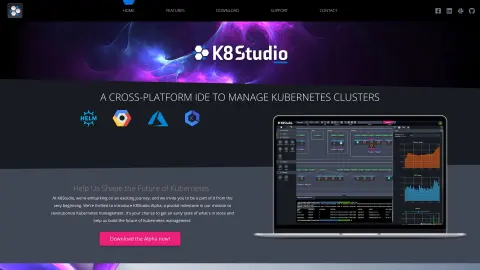
K8Studio is an integrated development environment (IDE) designed to simplify the monitoring and management of Kubernetes clusters. It features a powerful code editor, streamlined containerization tools, cluster management capabilities, and real-time debugging functions. K8Studio offers intuitive visualizations and comprehensive tools that transform complex cluster data into clear and actionable insights, helping users maintain control and efficiency throughout their work. It is compatible with major Kubernetes distributions and includes useful features such as CloudMaps, multi-cluster management, cluster overview, advanced logging capabilities, an AI assistant, a grid view, a YAML editor, and a selection overview tool.
How to use K8Studio?
To use K8Studio, please download and install it on your preferred platform. Once you open K8Studio and add your Kubernetes cluster, it will automatically read your existing .kube/config file without making any modifications to it. After that, you can explore various features such as CloudMaps for cluster visualization, a YAML editor for configuration management, and an integrated terminal for command-line operations.
The core features of K8Studio
CloudMaps is designed for intuitive visualization of clusters.
Multi-cluster management
Cluster Overview Including Key Metrics
Advanced logs used for debugging purposes
Integrated AI Assistant
The tabular display of Kubernetes objects in grid format
A YAML editor for configuration management purposes
Overview of options for detailed object information
Monitoring and measurement
Choose safety.
RBAC view
Helm view
Integrated Terminal
user permissions
Customizable docking layout
Multi-cluster management
Cluster Overview Including Key Metrics
Advanced logs used for debugging purposes
Integrated AI Assistant
The tabular display of Kubernetes objects in grid format
A YAML editor for configuration management purposes
Overview of options for detailed object information
Monitoring and measurement
Choose safety.
RBAC view
Helm view
Integrated Terminal
user permissions
Customizable docking layout
Related
MangaDex
Comic Reading and Community Platform
Chill Subs
Independent literary magazines and submission discovery platforms
China Writers Network
Official Website of the Chinese Writers Association
Atlas Obscura
A website dedicated to exploring the unique cultures and histories around the world
Spacefast
Anything created by AI can be easily managed and shared with just one click.
HiringNow
Job-seeking agents who closely monitor corporate official websites to submit applications in advance