AI TOOL / #04050
AI Roundtable
Ask a question and receive answers from multiple AI assistants.
Introduction
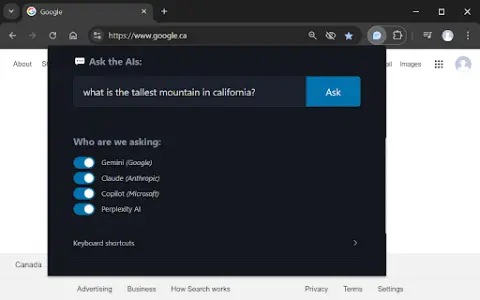
Ask one question, get answers from multiple AI assistants.
What is a Multiple AI Assistants Chrome extension/plug-in?
This website allows users to submit questions at once and receive answers from multiple AI assistants. Users can customize which assistant they want to use for their queries. The website also provides keyboard shortcuts, making it easy to access various functions quickly.
How to use the Multiple AI Assistants Chrome extension?
Use the shortcut keys Ctrl/Cmd + Shift + Q to open the query window and start typing your question. Use Alt + 1 to switch to Gemini, Alt + 2 to switch to Claude, Alt + 3 to switch to Copilot, and Alt + 4 to switch to ChatGPT.
The core functions of various AI Assistant extensions/plugins for Chrome.
Query multiple AI assistants simultaneously
It is possible to customize the selection of AI assistants.
Convenient and fast keyboard shortcuts
It is possible to customize the selection of AI assistants.
Convenient and fast keyboard shortcuts
Related
Parafrasear Textos
An AI-based rewriting tool designed to modify texts and eliminate instances of plagiarism.
TruthGPT – No Hallucinations, only Truth
TruthGPT is a truth-seeking AI chatbot that prioritizes accurate information and reduces disinformation.
elv.ai
An AI-powered content review platform that hides unsolicited comments and enhances user interaction.
Percent Human: Detect ChatGPT AI Content
An AI plagiarism detection tool for detecting content generated by ChatGPT and GPT-3.
Hive AI Detector
A free browser extension designed to detect AI-generated content across various media formats.
Choice
AI-powered tools for transcription, dubbing, content moderation, and subtitle generation.