AI TOOL / #04208
Shift-Ctrl-F: Semantic Search for the Browser
A Chrome extension that uses MobileBERT to search for and highlight answers on web pages.
Introduction
Chrome extension using MobileBERT to search and highlight answers on webpages.
What is the Shift-Ctrl-F Chrome extension/plugin?
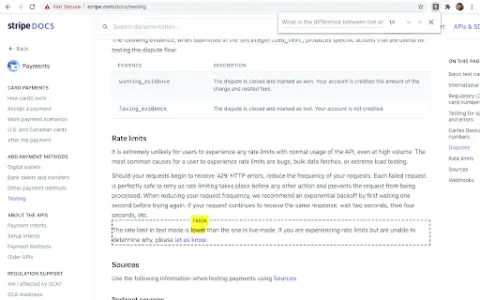
Shift-Ctrl-F is a Chrome extension that utilizes the MobileBERT model, which has been fine-tuned using the SQuAD dataset. This extension uses TensorFlowJS to search for answers on web pages and identify relevant elements. It allows users to enter natural-language queries and find corresponding answers within the content of the current page.
How to use the Shift-Ctrl-F Chrome extension/plugin?
1) Open the extension pop-up window using the toolbar or shortcut key (Shift-Ctrl-F).
2) Enter your natural language query in the search box.
3) Press Enter and wait for the model to return the results.
The core functionality of the Shift-Ctrl-F Chrome extension/plug-in.
Conduct natural language question-and-answer interactions on web pages.
Highlight relevant elements based on the search query.
Efficient processing using MobileBERT
Highlight relevant elements based on the search query.
Efficient processing using MobileBERT
Related
Finta
AI-driven fundraising assistant that automates investor relations workflows and maximizes fundraising potential.
Quanty
An artificial intelligence-based financial knowledge graph provides real-time insights into the market.
Optimum Vertex AI
An AI-based platform designed to assist in making informed trading decisions, thereby enhancing investment outcomes.
Rings AI – Pro
An AI-powered XRM system that helps relationship-driven companies identify and win opportunities.
Cash Coach AI
AI-powered financial management apps are used for budgeting, tracking expenses, and providing personalized financial insights.
Valuemetrix
Valuemetrix provides AI-driven investment insights and real-time market news to help you make more informed decisions.