AI TOOL / #05433
OpenAI expenses checker
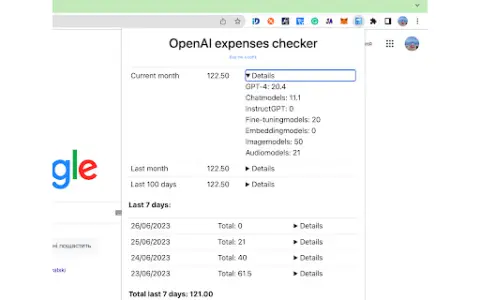
A Chrome extension that allows you to quickly check your OpenAI fees in your browser.
Introduction
Chrome extension for quickly checking OpenAI expenses directly in your browser.
What is the OpenAI Expenses Checker Chrome extension/plug-in?
The “OpenAI Fee Checker” Chrome extension offers a faster and more convenient way to keep track of your OpenAI costs. With this extension, you can directly access the fee-tracking functionality within your browser, saving time and eliminating the need to visit a separate website. It features a user-friendly interface that seamlessly integrates with your browser, and provides real-time updates and notifications, making cost management much simpler and more efficient.
How to use the OpenAI Expenses Checker Chrome extension/plug-in?
Install the “OpenAI Fee Checker” Chrome extension from the Chrome Web Store. Once installed, you will be able to check your OpenAI fees directly within your browser, without having to visit a separate website.
The core functionality of the OpenAI Expenses Checker AI Chrome extension/plug-in
Directly track expenses within the Chrome browser.
A simplified interface that facilitates quick and easy access.
Real-time updates and notifications
A simplified interface that facilitates quick and easy access.
Real-time updates and notifications
Related
Tidepool by Aquarium
Product analysis focused on AI text interfaces, aiming to identify patterns in user interactions via textual means.
Papyrus AI
A Slack chatbot for data analysis in plain English.
Feedback Rivers
The Feedback River system aggregates customer feedback into a visible and actionable record-keeping system.
Ada by BoostKPI
An AI data analyst for KPI anomaly detection and root cause analysis.
Lopus AI
Lopus AI: An intelligent growth engine that provides precise guidance for products, markets, and sales activities.
RTutor
Applications based on artificial intelligence are capable of converting natural language into R code for data analysis purposes.