AI TOOL / #06688
Vocha | Voice for ChatGPT
Vocha is a voice input extension specifically designed for ChatGPT, with an emphasis on privacy and ease of use.
Introduction
Vocha is a voice-typing extension for ChatGPT with a focus on privacy and ease of use.
What is the Vocha AI Chrome extension/plug-in?
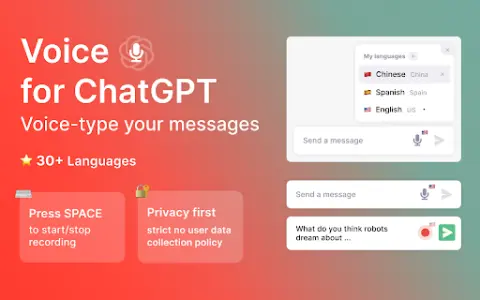
Vocha is a browser extension that allows users to input messages for ChatGPT via voice. It adds a microphone button to the message input field, which can be activated by using the SPACE key or by clicking on it. Vocha places great emphasis on user privacy, strictly adheres to policies that prohibit the collection of user data, and features a clean, minimalist design that ensures seamless integration with the ChatGPT interface.
How to use the Vocha AI Chrome extension/plug-in?
After installing the Vocha extension, a microphone button will appear in the ChatGPT message input box. You can press the SPACE shortcut key or click the microphone button to start and stop recording. You can change the language used for speech recognition by clicking on the flag icon. Remember to grant the microphone access permission during the installation process.
The core functions of the Vocha for Chrome extension/plugin
Provide voice input for messages sent via ChatGPT.
The SPACE shortcut key is used to start/stop recording.
Supports multiple languages (over 30 different languages).
Message editing options (send, edit, or continue recording)
The SPACE shortcut key is used to start/stop recording.
Supports multiple languages (over 30 different languages).
Message editing options (send, edit, or continue recording)
Related
Schedo
A comprehensive booking software that incorporates AI-based scheduling and payment acceptance features.
Scheduleai
Schedule AI simplifies the scheduling of meetings through a variety of collaboration features.
CloverAI
An AI-based schedule management tool that incorporates features such as a calendar, analysis tools, a pomodoro timer, and gamified tasks.
AI On It
Intelligent email assistant – identifies events and tasks contained in emails to help you stay organized.
Morgen
A time management platform that integrates calendar, task, and scheduling features, and is equipped with AI-driven planning capabilities.
Agenda Hero for Chrome
A Chrome extension that allows users to create calendar entries from text with just one click.