AI TOOL / #07462
Vision AI
A Chrome extension that enables AI-driven insights based on screenshot data.
Introduction
Chrome extension for AI-powered insights from screenshots.
What is a Vision AI Chrome extension/plug-in?
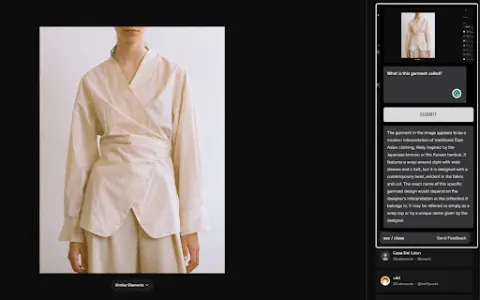
Visual AI is a Chrome extension that combines screenshot functionality with AI-driven insights to enhance online information search. It allows users to capture any portion of a web page, add notes or questions, and receive AI-generated responses based on the context of the captured image.
How to use the Vision AI Chrome extension/plug-in?
Install the Visual AI Chrome extension. Use CTRL + SHIFT + Y to take a screenshot, and then add any notes or questions you have. Visual AI will analyze the screenshot and provide an AI-generated response.
The core functions of the Vision AI Chrome extension/plugin
Screenshot capture
Interactive AI Suggestions
Seamless browser integration
Suitable for a wide range of applications in various fields
Privacy and Security
Interactive AI Suggestions
Seamless browser integration
Suitable for a wide range of applications in various fields
Privacy and Security
Related
Parse.dev
AI-driven data analysis tools that simplify data analysis without SQL or coding.
UnStruct AI
UnStruct.ai: Contextual analysis of diverse data sources using customizable RAG and LLM.
VerbaGPT
A tool that uses LLMs for data analysis, focusing on data privacy and ease of use.
Anilyst
An AI-driven platform for data analysis, insights generation, and visualization.
wyd.chat
An iMessage data analysis tool that provides statistics and insights regarding SMS messages.
Supaboard AI
Artificial intelligence-powered business intelligence tools that enable the creation of dashboards and data analysis without requiring specialized knowledge.