AI TOOL / #08846
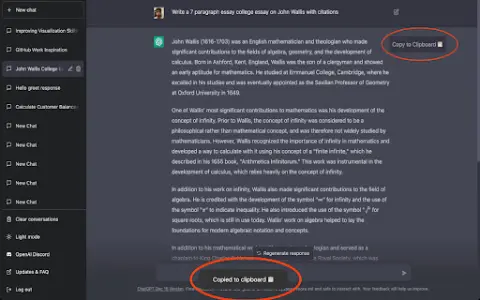
Copy for Chat GPT
An extension used to copy ChatGPT responses and check for plagiarism.
Introduction
Extension to copy ChatGPT responses and check for plagiarism.
What is the Plagiarism Detector Extension for Chrome – an extension/plug-in for Google Chrome?
This extension allows you to copy the responses generated by ChatGPT by clicking a button or using the CMD+K shortcut key, and then have those responses checked by plagiarism detection tools.
How to use the Plagiarism Detector Extension for Chrome?
You can use this extension by clicking the copy button on ChatGPT’s response or by pressing CMD+K. The copied text will be automatically checked to determine whether it contains any plagiarized content.
The core functionality of the Plagiarism Detector Extension for Chrome.
One-click to copy the response from ChatGPT
Use the CMD+K shortcut key to copy.
Automatic plagiarism detection
Use the CMD+K shortcut key to copy.
Automatic plagiarism detection
Related
Synthical: Science, Simplified
Synthical utilizes artificial intelligence to streamline the processes of conducting research, learning, and sharing knowledge.
Crammer: Save time using AI
Crammer is a Chrome extension that uses AI to extract key information from articles.
tl;dr: GPT3 News Summarizer
An AI-based news summary tool that uses GPT3 to extract information quickly and efficiently.
SumMe – AI Article Summarizer
An AI web article summary generator based on GPT-4, which provides concise summaries.
WP AI Text Summarizer
A WordPress plugin designed for AI-powered text summarization, aimed at enhancing SEO performance and increasing user engagement.
T.read – AI based reading assistant
T.read is an AI-powered reading assistant that provides concise summaries of articles.