AI TOOL / #03966
OneClick AI
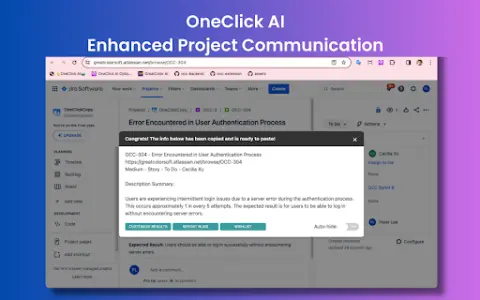
OneClick AI simplifies workflows by allowing users to extract and summarize content with just one click.
Introduction
OneClick AI streamlines workflows by extracting and summarizing content with a single click.
What is the OneClick AI Chrome extension/plugin?
OneClick AI is a tool designed to streamline workflows by enabling one-click extraction and summarization of content. It enhances productivity in areas such as project management, cross-team collaboration, personal research, and information sharing. The tool allows users to customize the appearance of the results, and all extracted data is immediately copied to the clipboard for further use.
How to use the OneClick AI Chrome extension/plug-in?
You can activate OneClick AI by clicking on the expansion icon in the toolbar, right-clicking to open the context menu, pressing the shortcut key, or right-clicking on the expansion icon in the toolbar.
The core functionality of the OneClick AI Chrome extension/plug-in
One-click extraction and summarization of content
Multilingual summary
The result is automatically copied to the clipboard.
Multilingual summary
The result is automatically copied to the clipboard.
Related
Shape
Shape is an AI data analyst that can connect to your database and answer questions.
ChartFast
AI-based data analysis tools that simplify data visualization and analysis.
ShenShu
ShenShu offers free Bazi analyses and provides insights into one’s fate through AI-based interpretations.
Chartify
AI-driven chart and graphic generation enabled through natural language queries.
Thalla
The AI Chief Assistant is designed to automate reminders, task management, and scheduling activities, thereby enhancing productivity.
trevorai.com
An AI-based task and calendar management tool that utilizes time-blocking technology.